Cost Estimator guide
Work out a project's people cost: who is needed, for how much of their time, and for how many days. You need an account and access to the Cost Estimator. If you don't have it yet, press Request access next to it under Your access on Your account, and you'll get an email when the administrator decides.
1Describe the project
Open Menu, then Apps, and choose Cost Estimator. Type the Project name; that's the only box you must fill in. You can also add a description and links to the project's Jira and Confluence pages (they must start with https://).
2Add the resources
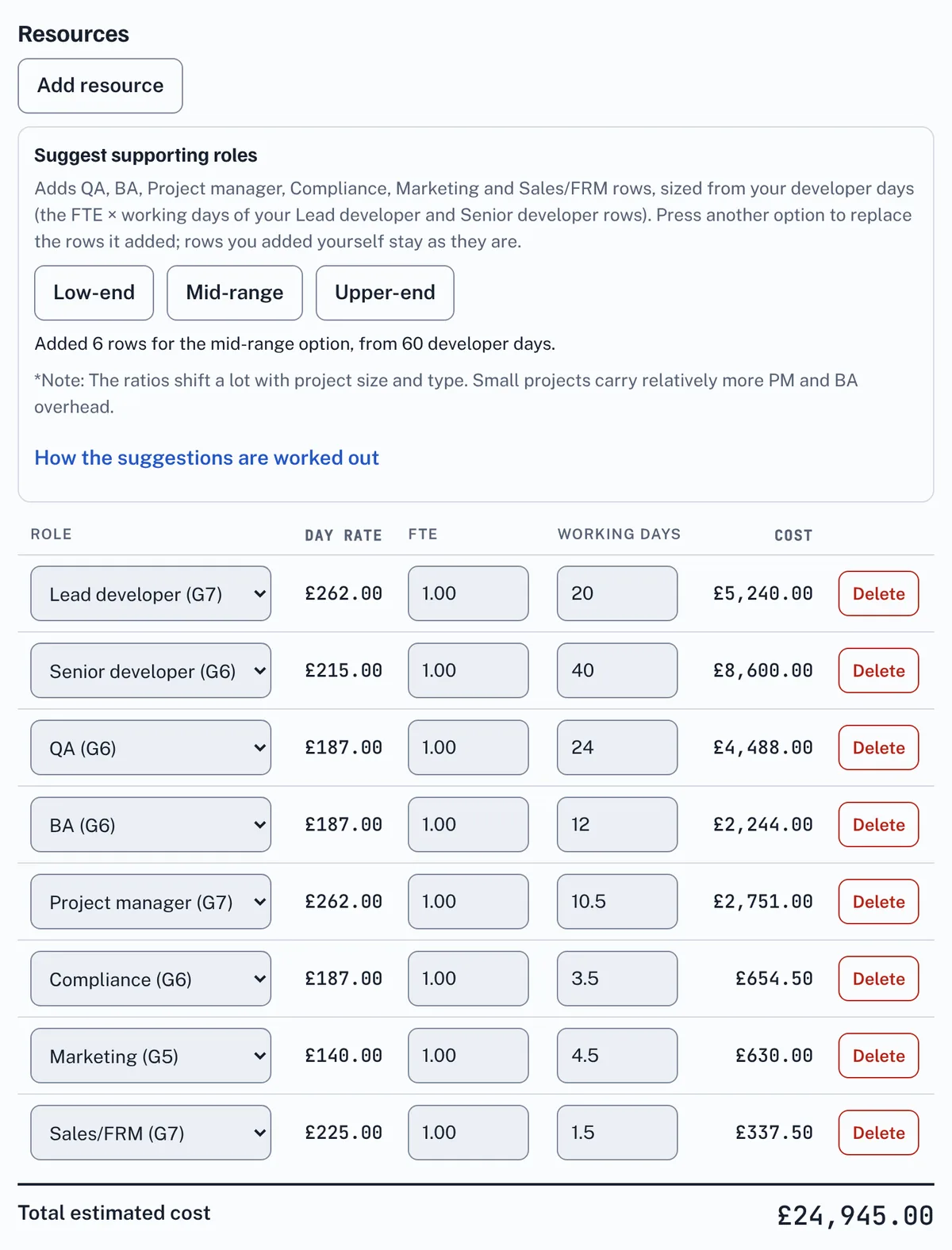
Press Add resource for each person or role the project needs. In each row:
- Role: Lead developer (G7), Senior developer (G6), Lead QA (G7), QA (G6), BA (G6), Project manager (G7), Compliance (G6), Marketing (G5) or Sales/FRM (G7). The row shows the role's day rate.
- FTE (full time equivalent): how much of their time goes on the project, from 0.01 to 1.00, to two decimal places. It starts at 1.00, which is full time; 0.5 is half their time and 0.25 a quarter.
- Working days: the estimated days, in whole or half days.
Each row's Cost is the day rate × FTE × working days, so 10 days of a Lead developer at 0.5 FTE costs £262 × 0.5 × 10 = £1,310.00. Each row is rounded to the nearest penny. Total estimated cost adds up every row. Delete on a row removes it straight away.
Not sure how much support the developers need? Add your Lead developer and Senior developer rows first, then under Suggest supporting roles press Low-end, Mid-range or Upper-end. EstimateIt adds QA, BA, Project manager, Compliance, Marketing and Sales/FRM rows sized from your developer days, using common rules of thumb. Open How the suggestions are worked out to see the ranges behind each option. Pressing another option replaces the rows the last one added, and any row you change becomes yours. The ratios shift a lot with project size and type, and small projects carry relatively more PM and BA overhead, so treat the suggestion as a starting point.
3Save, open and delete estimates
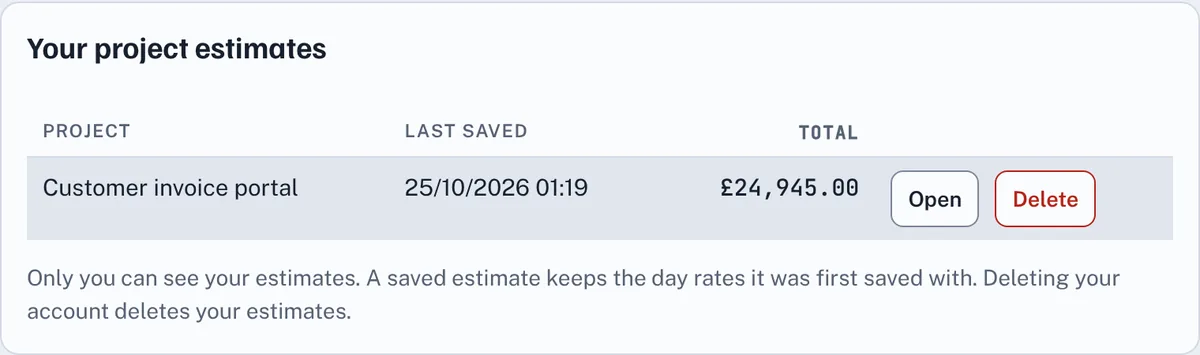
Press Save estimate. It appears under Your project estimates, newest first, where Open brings it back to change and save again. To delete a project, press its Delete button twice. New estimate starts an empty one; if you have changes that aren't saved, press it twice.
5Good to know
- Only you can see your estimates, and deleting your account deletes them.
- A saved estimate keeps the day rates it was first saved with, so a later change to the rates doesn't alter it.
- A project can have up to 50 resource rows, and you can keep up to 200 estimates.
- If you try to close the tab, reload or leave the page with changes that aren't saved, your browser asks whether you want to leave. Choose to stay, then press Save estimate.
Glossary
The words used in the Cost Estimator, A to Z.
- Copy summary, Copy as CSV and Print
- Ways to share an estimate: as text for an email, Teams or Jira, as a table for a spreadsheet, or on paper or as a PDF.
- Cost
- What one row costs: the day rate × FTE × working days, rounded to the nearest penny.
- Day rate
- What one day of a role costs. Each role has its own; a saved estimate keeps the rates it was first saved with.
- Estimate
- One project's name, details and resource rows, saved under Your project estimates. Only you can see your estimates.
- FTE
- Full time equivalent: how much of a person's time goes on the project, from 0.01 to 1.00. 1.00 is full time and 0.5 is half their time.
- Grade
- The pay grade shown after each role, such as G6 or G7, which sets its day rate.
- Low-end, Mid-range and Upper-end
- The three options under Suggest supporting roles. Each adds QA, BA, Project manager, Compliance, Marketing and Sales/FRM rows sized from your developer days, using smaller or larger rules of thumb.
- Request access
- The button on Your account that asks the administrator to let you use the Cost Estimator.
- Resource
- One row of an estimate: a role, its FTE and its working days.
- Role
- The kind of person a row is for, such as Lead developer (G7) or QA (G6).
- Total estimated cost
- The cost of every row added together.
- Working days
- How many days of that role the project needs, in whole or half days.
Cookie policy · Cookie settings · Accessibility · EstimateIt is an independent tool and is not affiliated with Atlassian or Jira. · Version 1.23.0